
Download Gmail Sender Switcher – Gmail Automation, Email Management, Email Productivity
Overview
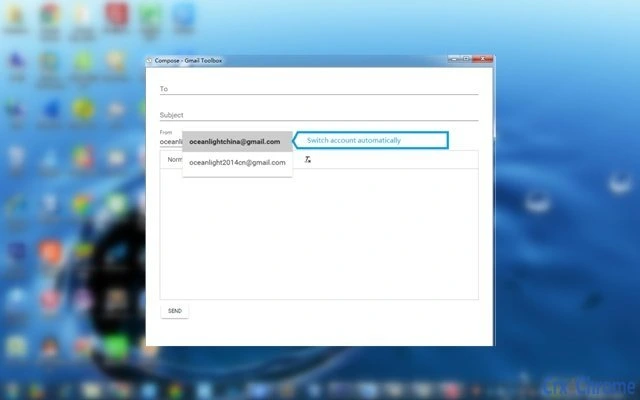
The Gmail Sender Switcher is a browser extension designed to streamline email workflows for users managing multiple Gmail accounts. It enables automatic switching of the "From" address when composing emails, based on predefined rules tied to the recipient. This functionality addresses a common pain point for professionals, freelancers, and individuals who maintain separate accounts for personal, business, or project-specific communication. By automating the selection of the sender address, the tool reduces the risk of sending messages from the wrong account, enhancing accuracy and professionalism.
Target users include remote workers, digital marketers, customer support teams, and anyone who relies on Gmail for frequent cross-account communication. The extension supports core email operations such as sending, receiving, and receiving notifications for new messages, making it a comprehensive tool for managing email flow. Real-world use cases include automatically assigning a business email when replying to a client, or switching to a personal account when emailing friends. The developer, WiseElement, has positioned this tool as a practical solution for improving email organization and productivity.
Key Features & Capabilities
- Automatic Sender Switching – The extension detects the recipient’s email address and automatically selects the appropriate "From" address based on user-defined rules. This eliminates manual selection and reduces errors.
- Recipient-Based Rules Engine – Users can configure rules to match specific email domains or addresses, triggering the correct sender account without intervention.
- Full Email Functionality – Supports sending, receiving, and real-time notifications for new incoming emails directly within the Gmail interface.
- Seamless Integration – Works directly in the Gmail web environment, requiring no changes to existing workflows or account settings.
- Notification Alerts – Provides timely alerts when new emails arrive, helping users stay responsive without constantly checking their inbox.
These features are particularly useful in scenarios such as managing client communications across multiple business accounts, organizing personal and professional correspondence, or automating routine replies. By reducing repetitive manual steps, the tool enhances efficiency and supports a more organized email experience. The extension operates entirely within the browser, ensuring compatibility with existing Gmail workflows and minimizing disruption.
User Interface, Workflow & Performance
The Gmail Sender Switcher integrates directly into the Gmail web interface, maintaining a clean and unobtrusive presence. The user interface is minimal, focusing on functionality rather than visual complexity. Navigation is straightforward, with settings accessible through the browser’s extension menu. Users can configure rules and preferences via a simple configuration panel, likely embedded within the Gmail interface or a dedicated popup window.
Workflow efficiency is improved by eliminating the need to manually select the sender address each time an email is composed. The automation occurs in real time, reducing composition time and minimizing the risk of human error. The developer did not specify resource usage details, so general performance observations are based on typical browser extension behavior. Stability appears to be consistent with standard extensions, as no issues were reported in the provided information. The extension runs in the background, consuming minimal system resources during idle periods.
Compatibility & System Requirements
The Gmail Sender Switcher is compatible with Windows, Mac, and Linux operating systems, supporting the latest versions of major web browsers. It is designed to function exclusively within the Gmail web environment, meaning it does not operate as a standalone desktop application. The installation size is 2.1 MB, indicating a lightweight footprint. The extension requires access to Gmail data and browser permissions to function properly.
Exact system requirements were not listed. Compatibility information was partially provided, focusing on OS support rather than hardware specifications. Users should ensure their browser is up to date to maintain full functionality. No specific CPU or RAM usage thresholds were provided, so performance expectations are based on general extension behavior. The extension is intended for use with Gmail, and its features are dependent on the Gmail web platform.
Pros and Cons
Pros
- Automatically switches sender address based on recipient, reducing errors.
- Supports sending, receiving, and real-time email notifications.
- Lightweight at only 2.1 MB in size.
- Free to download and use with no hidden costs.
- Seamless integration with Gmail’s web interface.
Cons
- Only works within the Gmail web interface, not in desktop clients.
- No information provided on advanced customization options.
- Dependent on browser and Gmail platform stability.
- Does not support offline email management.
- Limited to Gmail accounts; not compatible with other email providers.
FAQ Section
Is the Gmail Sender Switcher compatible with all browsers?
The extension is designed to work with major browsers that support Chrome extensions, though specific browser compatibility was not detailed. It is recommended to check the official website for updated compatibility information.
Is the extension safe to use with my Gmail account?
The extension requires access to Gmail data to function, so it is important to install it only from trusted sources. The developer, WiseElement, is listed as the provider, and the extension is hosted on official platforms. Always review the permissions requested during installation.
How often does the extension update?
Update frequency was not specified. Users should check the extension’s official page or browser store listing for release notes and version history.
Does the extension require a license or subscription?
No, the Gmail Sender Switcher is available for free with no subscription or licensing fees. It is a one-time download with no recurring costs.
Can I use this extension offline?
Since the extension operates within the Gmail web interface, it requires an active internet connection. Offline email management is not supported.
Final Thoughts + CTA
The Gmail Sender Switcher delivers a focused, practical solution for users managing multiple Gmail accounts. Its core functionality—automatically switching the sender address based on the recipient—addresses a common workflow bottleneck with precision and simplicity. While it is limited to the Gmail web platform and does not support other email services, its lightweight design and free access make it a compelling choice for productivity-focused users.
Professionals, freelancers, and anyone juggling multiple email identities will benefit most from its automation features. The seamless integration, real-time notifications, and error-reducing capabilities enhance both efficiency and reliability. With no cost and minimal system impact, it offers strong value for its intended use case.
Download Gmail Sender Switcher now to streamline your email workflow and boost productivity today.







